Remote Control for Onn Roku TV
MONIQ TAP., CO LTDHouse & Home
4.678.00 Reviews
- Version
- 1.5
- Installs
- 100.00K
- Age Rating
- Everyone
Screenshots
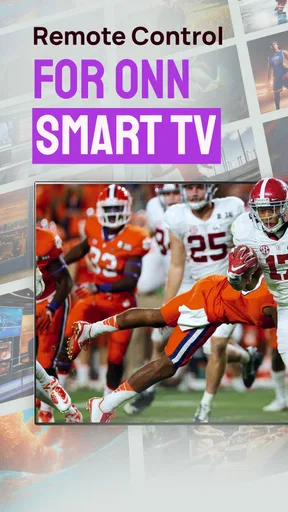
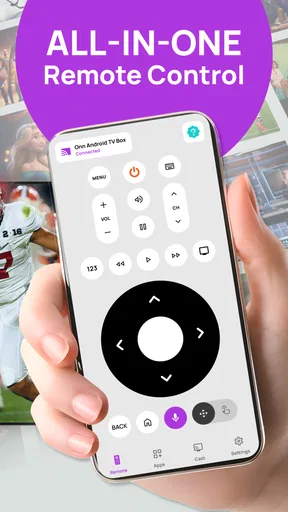
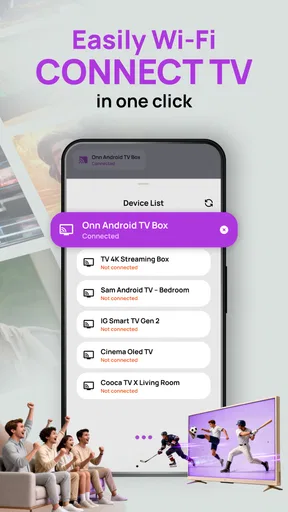
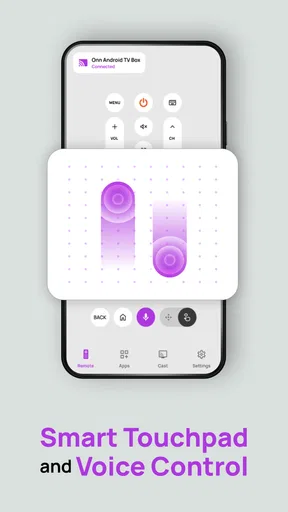
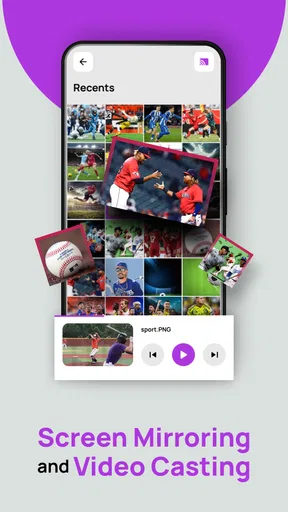
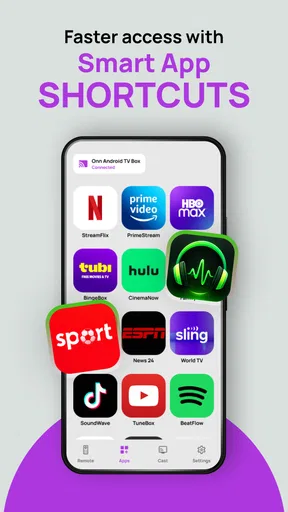
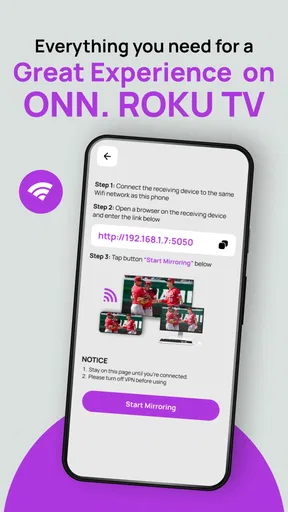
Our Review of Remote Control for Onn Roku TV
 Analysis by Appyee
I usually judge a remote-control app twice: first by how quickly it solves an annoying problem, and then by whether I still want it on my phone after the original excitement disappears. Remote Control for Onn Roku TV makes a strong first impression because it targets a very specific household need. If the physical remote is missing, out of reach, or simply inconvenient, the phone becomes a practical replacement rather than another gadget looking for a purpose.
This free House & Home app is made by MONIQ TAP., CO LTD for Onn Roku TVs. Its main job is straightforward: connect the phone to a compatible television and provide remote-control functions, with casting and mirroring included in its overall purpose. I tested it with the mindset of someone who wants fewer little interruptions during an ordinary evening, not someone looking for a complicated smart-home system.
The first-week appeal is easy to understand. A phone is usually nearby, familiar, and easier to find than a small remote that has slipped between cushions. The app has also attracted a 4.6 average from around 935 ratings, while its install count has passed 50 thousand. Those figures suggest that the basic idea resonates with a useful group of TV owners, although they should not be treated as a guarantee that every Onn Roku setup will behave identically.
What using it feels like during the first week
My first priority with a remote app is not visual polish. I want to know whether I can get from opening the app to controlling the TV without having to rethink my home network. With this kind of tool, the television and phone need to be discoverable to each other, so the most important early habit is making sure they are connected to the same local Wi-Fi environment. If that simple condition is overlooked, an otherwise useful app can appear unreliable.
Once the connection is established, the attraction is immediate. I can leave the phone on the coffee table, use it while the physical remote is charging or misplaced, and avoid the familiar search through blankets and side tables. That convenience matters most in homes where several people use the same television and the remote tends to migrate from room to room.
A realistic evening example is a good test. I might finish dinner, sit down with the TV already on, and realize the remote is in another room. Instead of getting up, I open the app, connect to the television, and use the phone as the control surface. Later, if I want to send something from the phone to the larger screen, the casting and mirroring angle gives the app a second role. It is not just an emergency replacement; it can become part of a small living-room routine.
The phone interface also changes the way I think about navigation. A traditional remote gives me physical buttons that I can learn by touch, while a phone offers a screen that is easier to read and harder to operate without looking. That is a real trade-off. I prefer the app when I am already holding my phone, but I prefer a physical remote when I want to adjust volume or move through menus without taking my eyes off the program.
One useful early tip is to treat the first connection as setup rather than something to repeat casually. I would open the app while both devices are awake, confirm that the correct television is selected, and then test several basic actions before relying on it for a movie night. This small check prevents the most irritating situation: discovering that the phone is not ready only after everyone has settled in.
Another practical point is that the app is most valuable when it fills a gap in an existing setup. I would not install it simply because every smart TV owner must have a second remote. I would install it if the physical remote is frequently lost, if more than one person needs control, or if using the phone for casting and mirroring is already part of the household’s routine.
The app is rated for Everyone, which fits its simple household purpose. It runs on Android eight point zero and later, so owners of older supported phones may still be able to use it without replacing their device. Its current version is 1.4, and the release date is March 20, 2026. Those details are worth checking against the software on your own phone before planning around it, especially if you keep an older handset as a dedicated household controller.
Where the phone beats the usual remote
The strongest advantage over a standard remote is recoverability. A physical remote can disappear silently, while a phone can usually be located through the normal habits of daily life. I also find a phone easier when I want to move between controlling the TV and sharing something from the handset. That combination makes the app more useful than a simple duplicate of plastic buttons.
It can also help in a shared home. One person may be watching from the sofa while another is using the physical remote elsewhere, and a second control option reduces small arguments about who has to get up. For older family members, however, the result depends on comfort with touchscreens. The larger, familiar buttons of a physical remote may remain easier than a phone interface, particularly in a dim room.
The casting and mirroring functions deserve a careful expectation. I see them as convenience tools for moving phone content to the TV, not as a replacement for every dedicated streaming or presentation workflow. Their value depends on what I want to show and how often I do it. A quick household photo session or a piece of content already on the phone is a natural fit; a person who needs advanced media controls may be happier with a dedicated platform app or the television’s own software.
The first month: convenience versus habit
After the novelty fades, a remote app has to earn a permanent place through repetition. In my experience, the recurring value here comes from three small situations: the physical remote is missing, I am already holding the phone, or I want to send phone content to the television. If none of those situations occurs regularly, the app may become forgotten storage rather than a daily tool.
The best long-term workflow is to give it a predictable home on the phone. I would place it near other household utilities instead of leaving it buried in a folder. That sounds minor, but a remote app loses much of its advantage if finding the app takes longer than finding the actual remote. The point is not to turn the phone into a permanent television accessory; it is to make the alternative available at the moment it is useful.
I would also avoid opening it for every single adjustment if the physical remote is already in my hand. Phone control is not automatically better. It can require waking the phone, unlocking it, launching the app, and looking at the screen. For a quick volume change, the traditional remote usually wins. For a longer session where the remote is unavailable, the balance shifts in the app’s favor.
This is where the product’s lasting value becomes personal rather than universal. In a home with a reliable remote that never goes missing, the app may feel unnecessary after the first week. In a home where remotes are constantly misplaced or where several people need access, the same app can quietly become a dependable backup. I would describe it as a practical utility with recurring value, not an essential companion for every Onn Roku TV owner.
Its free entry point makes that decision easier. I can try the basic experience without committing money at the start, then decide whether it fits my routine. There are in-app purchases ranging from $4.99 to $39.99 per item, so I would pay attention to any purchase screen and consider whether the functions I actually use justify the cost. The free availability is helpful, but it does not automatically mean every part of the experience is equally convenient without spending.
What maintenance really involves
The maintenance burden is less about physical upkeep and more about preserving a reliable connection. I would keep the phone and television on the expected network, avoid assuming that a connection problem means the app itself has failed, and test the app after major changes to the home network. A new router, a changed Wi-Fi name, or a different network arrangement can affect the discovery process even when the television is working normally.
That leads to a useful troubleshooting order. First, I would check whether the TV is powered on or available in its normal standby state. Next, I would confirm that the phone is using the same local network and that the intended television is selected. Then I would close and reopen the app before making more complicated assumptions. This sequence is simple, but it prevents wasted time and keeps a small household problem from becoming a full technology project.
I would also keep the app updated through the normal app-management routine. The current version is 1.4, and staying current is sensible for a connection-dependent utility. At the same time, I would not treat an update as a guarantee that every pairing issue disappears. Network conditions, TV settings, and the phone itself remain part of the experience.
One advanced but practical use is keeping an older compatible phone as a dedicated controller. That can be convenient in a family room, provided the device remains charged and connected. It also changes the app’s role: instead of competing with my everyday phone, it becomes a shared household tool. The trade-off is another device to maintain, so I would only do this if the TV is used frequently enough to justify it.
Privacy and battery awareness also matter in ordinary use, even without turning the app into a technical investigation. A remote app is most convenient when the phone is available, so I would avoid relying on a nearly empty battery during an important viewing session. I would also use the app only when I need it rather than leaving it open indefinitely. These are small habits, but they make the difference between a useful backup and a source of irritation.
The friction that appears with repeated use
The biggest source of fatigue is the gap between “my phone is nearby” and “my phone is ready to be a remote.” A physical remote is already dedicated to one purpose. A phone is busy with notifications, calls, lock screens, battery limits, and other apps. Every extra step is noticeable when I only want to pause something for a moment.
Touch controls can create another kind of tiredness. Physical buttons provide location and resistance, so I can often operate them without looking. A phone does not offer the same tactile certainty. If I am watching in a dark room, I may need to wake the screen and visually confirm each action. That makes the app less attractive for rapid, repeated adjustments than a conventional remote.
Connection dependence is the second major weakness. The app’s usefulness is tied to the relationship between the phone, the network, and the Onn Roku TV. If the TV is not discovered, the app cannot provide the effortless experience I want. This is not a reason to reject it, but it is a reason to keep the physical remote available as a fallback rather than treating the phone as the only control method.
Mirroring can also raise expectations. It sounds like a broad solution, but different phone content and viewing situations can make the experience feel more or less natural. I would use it when the phone is the source of something I specifically want on the larger screen. I would not choose it automatically for every video, especially when a native TV app offers a cleaner, more direct way to watch.
There is also the question of payment. Because the app is free to start but includes paid items, I would be cautious about paying for features before using the free experience enough to understand my own habits. Someone who only needs an occasional emergency remote may not get enough repeated value from a purchase. Someone who regularly uses the phone as a controller and makes frequent use of casting or mirroring may view the optional spending differently.
For that reason, I would skip this app if I expect a completely hands-off replacement for the physical remote, if my home network is intentionally isolated between devices, or if I dislike using a phone during television time. I would also skip it if I mainly want advanced television-specific functions that are better handled by the original remote or the TV maker’s own control solution.
Who will keep using it?
I think it suits Onn Roku TV owners who regularly misplace remotes, households that want a second control option, and people who already keep their phone beside them while watching television. It is particularly sensible for a guest room or shared living space where a missing remote can be disproportionately annoying.
It is less convincing for someone who has a dependable physical remote, rarely casts from a phone, and wants the fastest possible one-button interaction. In that case, installing it may solve a problem that does not really exist. A dedicated remote also remains the better choice for users who need tactile controls, accessibility features tied to physical buttons, or operation when the phone is unavailable.
The developer, MONIQ TAP., CO LTD, has kept the product focused around the Onn Roku TV use case rather than presenting it as a universal household controller. That focus is helpful because I know what problem I am downloading it to solve. It also means I should not assume that a positive experience with one television or network will translate to every other setup without doing the initial connection test.
My most useful recommendation is to judge it over a normal month rather than during the first exciting setup. Notice how often the physical remote is unavailable, how often the phone is already in your hand, and whether casting or mirroring becomes part of your routine. If those moments happen repeatedly, the app has earned its place. If they do not, uninstalling it later is a reasonable conclusion rather than a failure.
My long-term verdict
Remote Control for Onn Roku TV earns lasting space when it becomes a dependable backup, not when it tries to replace every part of the television experience. I like its clear purpose, its free starting point, and the way it combines remote control with phone-based casting and mirroring. The app can remove a surprisingly common household annoyance, especially when the physical remote is constantly disappearing.
Its limitations are just as clear. Phone controls are less tactile, connection issues can interrupt the convenience, and the optional purchases mean I would evaluate the paid side carefully instead of assuming it is necessary. The app also needs a small amount of network and device maintenance to remain dependable, while a traditional remote remains quicker for simple actions.
Overall, I would recommend trying it to an Onn Roku TV owner who wants a practical second remote and already uses a phone near the sofa. I would not recommend treating it as a universal upgrade or throwing away the physical remote. After the novelty fades, its value comes from a few repeated, realistic moments: finding control without searching, sharing phone content on the TV, and giving another person a way to operate the screen. If those moments match your home, this modest utility can become one of those apps you rarely notice but are genuinely glad to have installed.
Privacy and Permissions
See what permissions an app requests and how it handles your data.
- Phone
- read phone status and identity
- Photos/Media/Files
- read the contents of your USB storage, modify or delete the contents of your USB storage
- Storage
- read the contents of your USB storage, modify or delete the contents of your USB storage
- Wi-Fi connection information
- view Wi-Fi connections
- Device ID & call information
- read phone status and identity
- Other
- view network connections, allow Wi-Fi Multicast reception, full network access, run at startup, reorder running apps, control vibration, prevent device from sleeping, Google Play license check
Verdict
Strengths of Remote Control for Onn Roku TV
- Simple setup with automatic TV and network discovery
- Convenient keyboard for entering searches and passwords
- Dedicated playback controls make streaming easier
- Works well as a backup when the physical remote is missing
- Compact interface uses little storage and battery power
Limitations of Remote Control for Onn Roku TV
- Requires the phone and TV to share the same Wi-Fi network
- May not detect TVs on guest or isolated wireless networks
- Some features may vary between Onn Roku TV models
- Ads or premium prompts can interrupt occasional use
- Phone notifications and calls can disrupt remote control sessions
Other Releases by MONIQ TAP., CO LTD
View All
Car Play Connect Auto Sync
Auto & Vehicles4.4

OBD2 Car Scanner: Torque ELM
Auto & Vehicles4.1

Air Tag Detector: Find & Track
Tools4.5
Similar Picks in This Category
View All
Universal TV Remote Control
CodeMatics Media Solutions3.9

AlfredCamera Home Security app
Alfred Systems Inc.4.7

Planner 5D: AI Home Design
Planner 5D4.5

Universal Tv Remote-Cast to TV
One Music Player4.1

Zillow: Homes for Sale & Rent
Zillow Group4.8

99acres Buy/Rent/Sell Property
infoedge.com4.3
Frequently Asked Questions
What is Remote Control for Onn Roku TV, and how does it work?
Remote Control for Onn Roku TV is a mobile remote application designed to control compatible Onn Roku televisions from an Android or iOS device. After installation, the phone and TV generally need to be connected to the same Wi-Fi network. The app then searches for available Roku devices and provides virtual buttons for navigation, volume, playback, input selection, and other everyday functions.
Is Remote Control for Onn Roku TV compatible with every Onn television?
Compatibility depends on the television model, Roku software version, and the specific features supported by the app. It is primarily intended for Onn TVs that use the Roku TV platform, rather than Onn televisions running a different operating system. Before downloading, check the app listing and confirm that your phone, TV model, and operating system meet the stated requirements.
Does my phone need to be connected to the same Wi-Fi network as the Onn Roku TV?
In most cases, yes. The phone and Onn Roku TV must be connected to the same local Wi-Fi network so the application can discover and communicate with the television. If the TV is connected by Ethernet, it may still work if both devices share the same network. Guest networks, VPNs, router isolation, or different Wi-Fi bands can prevent detection.
Can this app replace the original Onn Roku remote completely?
The application can replace many everyday remote-control functions, including directional navigation, selecting channels or apps, entering text, controlling playback, and adjusting volume when supported by the TV. However, performance may vary by device and app version. You may still want to keep the physical remote for initial setup, network troubleshooting, pairing, or situations where the phone battery is unavailable.
What should I do if the app cannot find my Onn Roku TV?
First, confirm that the television is powered on and that both devices are connected to the same Wi-Fi network. Disable any VPN on the phone, restart the app and TV, and check whether the router is blocking communication between wireless devices. If the TV has recently changed networks, reconnect it through Roku settings. Updating the app and television software may also resolve connection problems.
